DualSense Edge Stick Module Replacement: What to Check First
Updated · Written by Javed Niamat
Confirm the symptom, follow Sony's replaceable-module procedure and check inputs again without treating calibration as a cure-all.
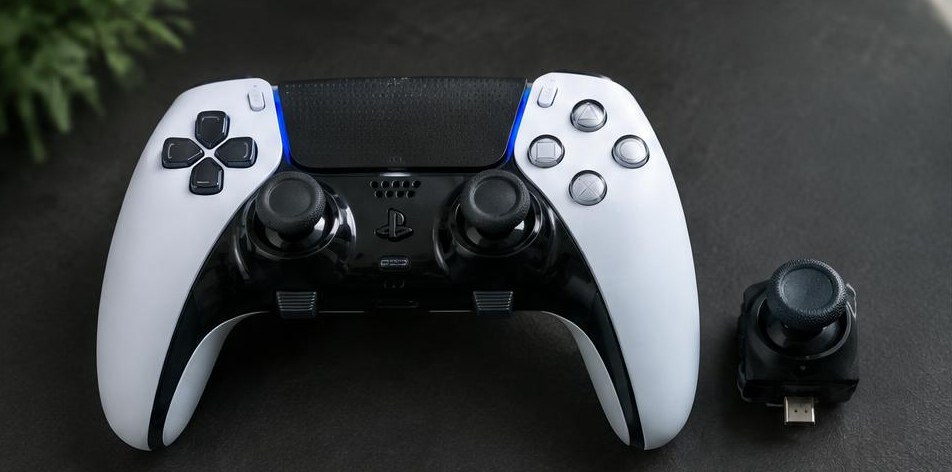
First, make sure it is an Edge
The DualSense Edge has replaceable stick modules. That matters: Sony's module-swap instructions are not instructions for opening a standard DualSense. Check the model name on your controller before buying anything. A different stick cap, a complete module and an internal replacement sensor are different products; do not assume they are interchangeable.
Record the symptom before changing the module
Run the stick drift test with the controller resting on a steady surface. Move each stick, release it and repeat. Note which side remains off-center, jumps during movement or has a click that does not register. Compare in a compatible game with a simple profile. These observations help you judge a change later, but a browser offset cannot tell you which internal part has failed.
Follow the official replacement procedure
Sony says to turn the controller off, check that the player indicator is off, and disconnect its USB cable before replacing a module. The Edge uses the RELEASE latch to remove the front cover, then an internal release lever to remove the module. Follow Sony's illustrated guide for the exact sequence and fit the module fully before closing the lever and cover. Do not force a stuck latch or substitute standard DualSense disassembly instructions.
Check the result with the same setup
Reconnect using the same cable, browser and game profile as before. Repeat the return-to-center check, slow full-range movements and stick-click presses. Compare your notes rather than demanding an exact 0.00 reading. Browser mapping and controller processing affect displayed values. A module swap should be assessed against the original symptom, not just a single number.
Calibration is not a universal repair
Some third-party tools offer calibration or changes to controller memory. This tester does not perform those operations. Do not assume a calibration utility supports your exact model, firmware or replacement module, and do not attempt board modifications to make settings persist. Use official support first if the replacement is not recognized or the input remains unreliable.
If the new module does not solve it
Check that the module is seated according to Sony's instructions and repeat the same comparison once. If the fault persists, stop buying parts based on guesses. Contact PlayStation support with the controller model, which module you replaced and the symptoms before and after. Replaceable modules make service more accessible, but they are not a guarantee against every cause of unwanted movement.